Back to Event Manager Main Menu
What's New in Event Manager?
Release Notes 10.12.2026
New Features
Bulk Category Update for Events
-
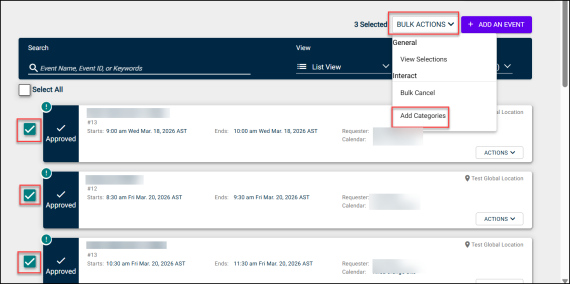
Tenant Admins and Event Admins can now add categories to multiple events at once directly from the Event List and Pending List pages, without opening each event individually.
-
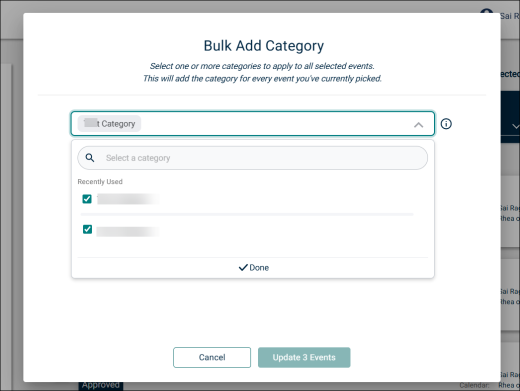
Select one or more events, choose Add Category from the Bulk Actions dropdown, and pick the categories to append.
-
Existing categories are never overwritten or duplicated.
-
The feature works on all event data, including migrated and legacy records.
Submit Event Requests on Behalf of Others
-
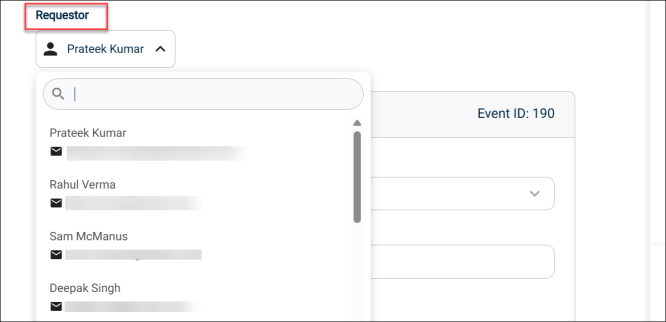
Tenant Admins and Event Admins can designate a Requester when creating an event on someone else's behalf.
-
The selected requester must be a member of an active organization or have the Universal Org Submitter permission.
-
The designated Requester will receive event notifications, have full access to manage the event, and will remain informed throughout the event life cycle. Both the admin and the Requester can continue to access the event.
-
Event history records both the submitter and the requester in the format: "User 1 submits event on behalf of User 2."
Improvements:
Session Timeout Warning
-
A popup now warns users 5 minutes before their session expires due to inactivity (sessions end after 40 minutes of inactivity).
-
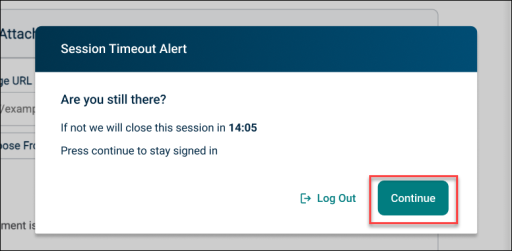
The popup, titled Session Timeout Alert, asks "Are you still there?" and shows a live MM:SS countdown.
-
Click Continue to stay signed in. You keep your current page and unsaved progress, and the session extends for another 40 minutes.
-
Click Log Out to sign out right away.
-
If you don't respond before the countdown ends, you are signed out automatically and sent to the login screen.
-
Active users are not interrupted. The system checks activity every 12 minutes, and if you are active it quietly extends your session without showing the popup.
Fixes
-
Fixed missing database indexes to reduce slow responses and timeouts in high-volume workflows.
-
Archived Release Notes
Click here to view previous releases that have been deployed to Event Manager.
Do you still have questions after reading the release notes? You can contact our Client Services team for assistance.
