Getting Started with Product-Led Onboarding
Our product-led onboarding is a self-guided experience designed to help you learn, explore, and get value from the platform, without waiting for human intervention.
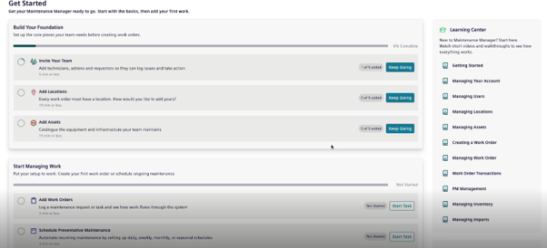
This onboarding screen guides users step-by-step to configure their workspace and begin managing maintenance tasks. It introduces essential setup areas and provides progress tracking to help admins and teams get up and running swiftly
NOTE This is for Admin only.
Getting Started
Build Your Foundation
The Build Your Foundation section helps in setting up the core elements needed before work orders can be created.
-
Invite Your Team: It guides you to add technicians, admins, and requestors so they can log issues and take action.
-
Action: Click Keep Going button to go to the Manage Users page and invite more members.
-
Add Locations: It guides you to location required to work orders.
-
Action: Click Keep Going button to go to Manage Location page and start adding locations.
-
Add Assets: It helps you to catalogue equipment and infrastructure that your team maintains.
-
Action: Click Keep Going button to land to Manage Asset page and add assets.
Start Managing Work
Once the foundation is setup, this section helps you to begin scheduling and tracking maintenance and work orders:
-
Add Work Orders: It guides you to log tasks and monitor workflow.
-
Action: Click Start Task button to land to the Work Order page and add your first work order.
-
Schedule Preventive Maintenance: It guides you to automate recurring maintenance tasks by setting daily, weekly, monthly, or seasonal schedules.
-
Action: Click Start Task button to go to the Preventive Maintenance page to begin scheduling.
NOTE
* Each step includes a progress tracker, so you know what’s complete or pending.
*Most steps are quick to complete and take less than 15 minutes.
Learning Center
Use this Learning Center to access quick tutorials and walkthroughs.
-
Getting Started
-
Managing Your Account
-
Managing Users
-
Managing Locations
-
Managing Assets
-
Creating/Managing Work Orders
-
Work Order Transactions
-
PM (Preventative Maintenance) Management
-
Managing Inventory
-
Managing Imports
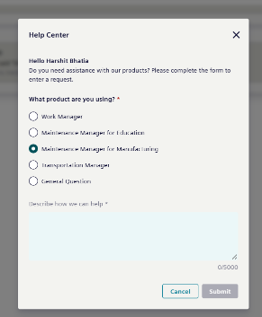
Contact Support
It is a quick way to contact the support if you are facing any issue using the product.
Just select the product you are using and describe the issue and click Submit.