Back to Asset Essentials Main Menu
Work Order Summary Report
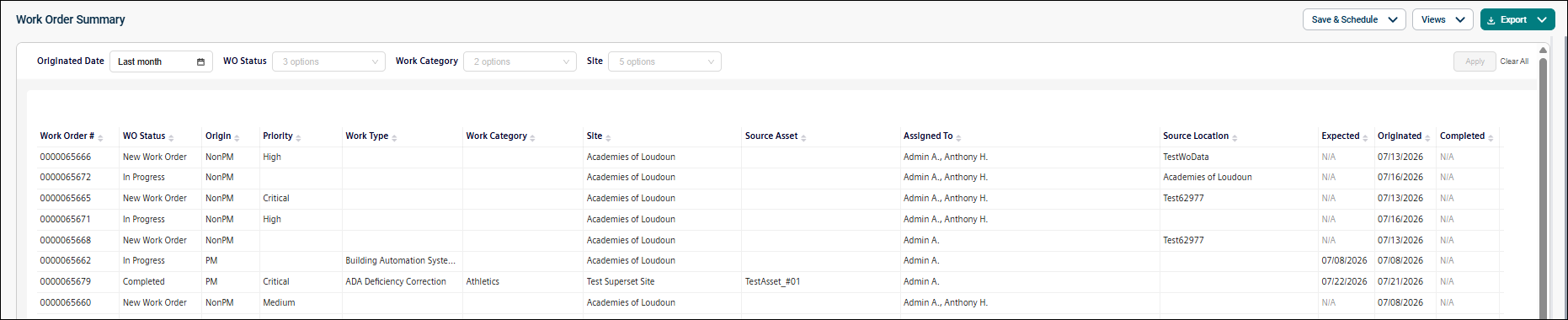
The Work Order Summary Report provides a consolidated view of work order activity, including completion information, labor hours, and costs. It helps users monitor maintenance performance and spending.
Use this report to:
-
Review work order costs and labor hours.
-
Monitor maintenance performance.
-
Analyze maintenance spending.
-
Identify aging or high-cost work orders.
-
Evaluate work order completion trends.
Getting Started
Filters
Filters are located above the main report area. Use them in any order.
|
Filter |
What It Does |
Default |
|
Date Originated |
Filters work orders within a selected date range. NOTE Refer to Limitations article for date selection. |
Last month |
|
WO Status |
Filters work orders by status. |
All |
|
Work Category |
Filters work orders by work category. |
All |
|
Site |
Filters work orders by the associated site. |
All |
Report Structure
This report summarizes work order activity and associated costs. Each row represents a work order.
Fields
|
Field |
Description |
|
Work Order # |
Displays the user-visible work order number. |
|
WO Status |
Shows the current status of the work order. |
|
Origin |
Indicates whether the work order was generated from a preventive maintenance schedule (PM) or created independently (Non-PM). |
|
Priority |
Displays the priority assigned to the work order. |
|
Work Type |
Indicates the reason the work is being performed (e.g., Corrective Maintenance or Storm Drainage). |
|
Work Category |
Shows the trade or skill category associated with the work order (e.g., HVAC, Electrical, or Plumbing). |
|
Site |
Displays the site associated with the work order. |
|
Source Asset |
Shows the asset associated with the work order. |
|
Assigned To |
Shows the first and last name of the user assigned to the work order. |
|
Source Location |
Displays the location associated with the work order. |
|
Expected |
Displays the date and time the work order is expected to be completed. |
|
Originated |
Indicates the date and time the work order originated. |
|
Completed |
Shows the date and time the work order was completed. |
Common Tasks
-
Review costs for a specific work order.
-
Analyze labor and material spending.
-
Identify high-cost work orders.
-
Monitor work order aging.
