Back to Asset Essentials Main Menu
PM Range Summary Report
The PM Range Summary report provides insights into preventive maintenance (PM) schedules within a selected date range. It helps you track upcoming work orders, monitor schedule compliance, and manage recurring maintenance activities across assets, sites, and locations.
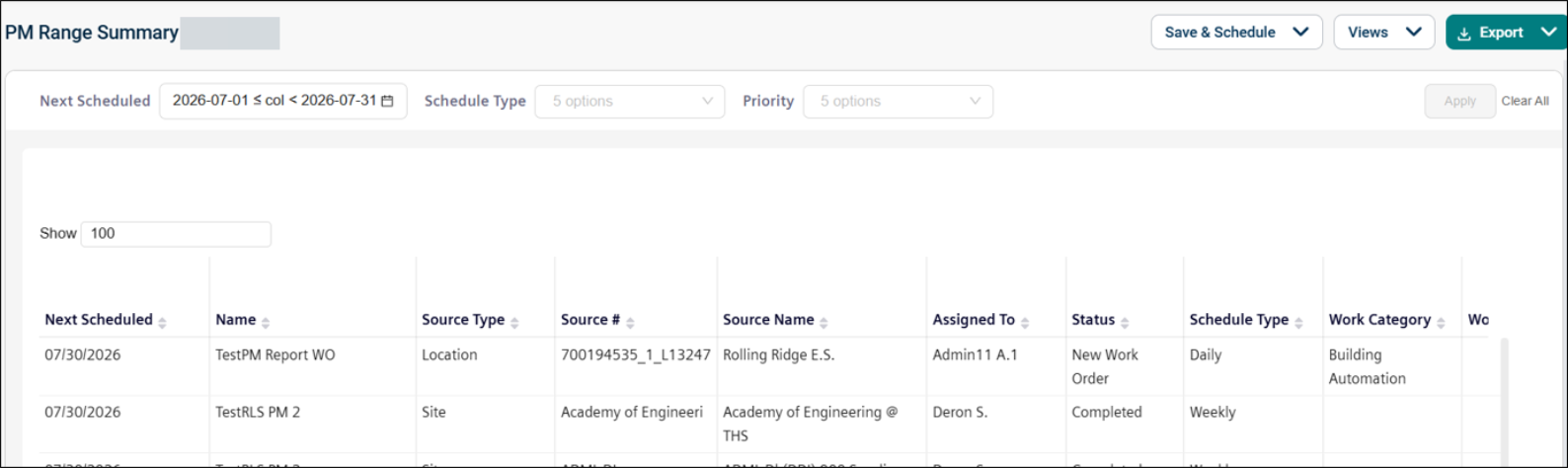
Use this report to:
-
Monitor upcoming preventive maintenance schedules within a date range.
-
Track recurring maintenance activities by schedule type.
-
Identify high-priority PMs requiring attention.
-
Review assigned users and planned maintenance work.
-
Support planning and compliance with maintenance schedules.
Getting Started
Filters
Filters are located above the main report area. Use them in any order.
|
Filter |
What It Does |
Default |
|
Next Scheduled |
Filters within a specific date range. NOTE Refer to Limitations article for date selection. |
Next 30 Days |
|
Schedule Type |
Filters the data by specific schedule type (e.g., Daily, Weekly, Monthly, etc.) |
All |
|
Priority |
Filters the data based on the urgency. |
All |
Report Structure
This report displays preventive maintenance schedules, including next scheduled dates, source details (asset, site, or location), assigned users, and estimated effort. Each row represents a PM schedule with its configuration, frequency, and expected work details. Date filtering is based on the next scheduled work order generation date.
Fields
|
Field |
Description |
|
Next Scheduled |
Displays the next date on which the PM schedule will generate a work order. |
|
Name |
Shows the name of the PM (Preventive Maintenance) schedule. |
|
Source Type |
Indicates the type of source linked to the PM (for example, Asset, Site, or Location). |
|
Source # |
Displays the user-visible identifier associated with the source (such as Asset Number). This field may be empty if not defined and is not the same as the system ID. |
|
Source Name |
Shows the name of the associated source (Asset, Site, or Location). |
|
Assigned To |
Displays the first and last name of the user assigned to the PM schedule. |
|
Status |
Indicates the work order status that will be applied when the PM generates a work order. |
|
Schedule Type |
Shows the frequency at which the schedule generates work orders (for example, Daily, Weekly, Monthly). This field may not apply to meter-based PMs, which are triggered by meter readings instead of time intervals. |
|
Work Category |
Displays the work category assigned to the generated work order. |
|
Work Requested |
Provides a description of the work to be performed, entered as free text. |
|
Est Hours |
Indicates the estimated number of hours required to complete the generated work order. |
|
Est Cost |
Displays the estimated cost to complete the generated work order. |
Common Tasks
-
View upcoming PM schedules within a timeframe, use the Next Scheduled filter.
-
Analyze schedules by frequency, filter by Schedule Type.
-
Identify urgent maintenance tasks, filter by Priority.
-
Review assigned users and planned work details for upcoming PMs.
