Back to Asset Essentials Main Menu
Inventory Issue Report
The Inventory Issue Report provides insights into issued inventory items by type, quantity, and destination. It helps you monitor inventory usage trends, track part consumption, and prevent stockouts.
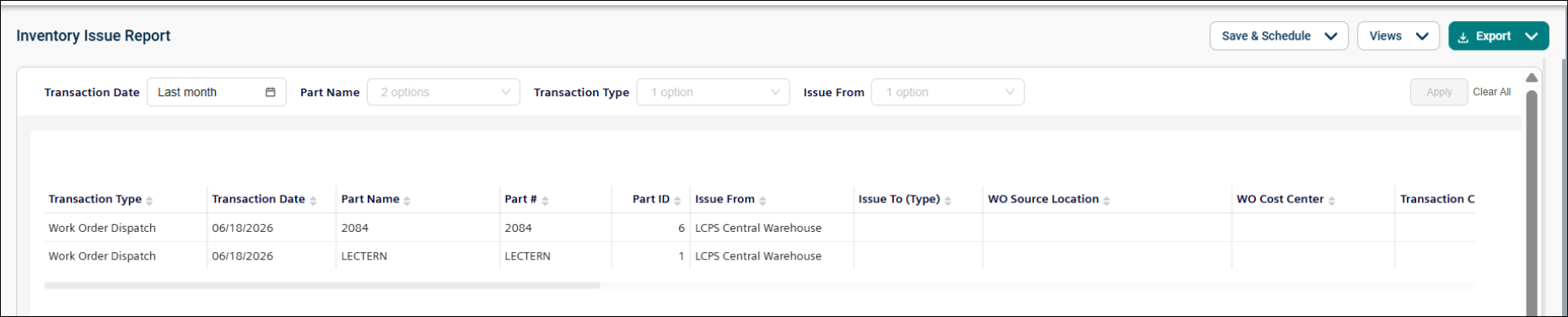
Use this report to:
-
Track issued inventory by part, quantity, and destination.
-
Monitor inventory usage across warehouses and locations.
-
Analyze transactions by type (for example, Issue or Work Order Dispatch).
-
Identify high-usage parts and prevent stock shortages
Getting Started
Filters
Filters are located above the main report area. Use them in any order.
|
Filter |
What It Does |
Default |
|
Transaction Date |
Show transactions from a specific date range. NOTE Refer to Limitations article for date selection. |
Last month |
|
Part Name |
Narrow down to one or more specific inventory parts by name |
All |
|
Transaction Type |
Indicates the type of transaction |
All |
|
Issue From |
It specifies the location from which the part was issued or transferred from a from-to transaction. |
All |
Report Structure
This report details inventory issue transactions, including part information, source and destination, quantities before and after the transaction, and associated costs. Each row represents a single inventory transaction, with cost values calculated based on part cost and quantity issued.
Fields
|
Field |
Description |
|
Transaction Type |
Type of transaction (e.g., Issue or Work Order Dispatch.) |
|
Transaction Date |
Date when the part transaction occurred. |
|
Part Name |
Name of the part being issued/dispatched. |
|
Part # |
Part number of the item being issued/dispatched. |
|
Part ID |
Unique identifier for the part. |
|
Issue From |
Source inventory location from where the part is issued. |
|
Issue To (Type) |
Destination type (Work Order, Asset, Site, Location, or User). |
|
WO Source Location |
Source location of the work order (if issued to Work Order). |
|
WO Cost Center |
Cost center associated with the work order. |
|
Transaction Cost Center |
Cost center tied to this transaction. |
|
Issue Destination |
Specific destination (WO #, Asset Name, Site Name, Location, or User.) |
|
Quantity Before |
Quantity available before the transaction. |
|
Quantity After |
Quantity available after the transaction. |
|
Quantity Difference |
Change in quantity (issued/dispatched amount.) |
|
Part Cost |
Displays the cost of the part. |
|
Total Part Cost |
Total cost = Part Cost × Quantity Difference |
|
Description |
Provides a description of the part. |
|
Inventory Transaction ID |
Unique identifier for the transaction |
|
Notes |
Additional notes related to the transaction |
|
Work Order ID |
Unique identifier of the work order |
|
Transacted by User |
Name of the user who performed the transaction |
|
Work Order # |
Displays the work order number linked to the transaction. |
Common Tasks
-
Review issued parts within a specific period, use the Transaction Date filter.
-
Analyze usage of a specific part, filter by Part Name.
-
Review transactions by type, filter by Transaction Type.
-
Track inventory issued from a specific location, filter by Issue From.
