Back to Asset Essentials Main Menu
Department Summary Report
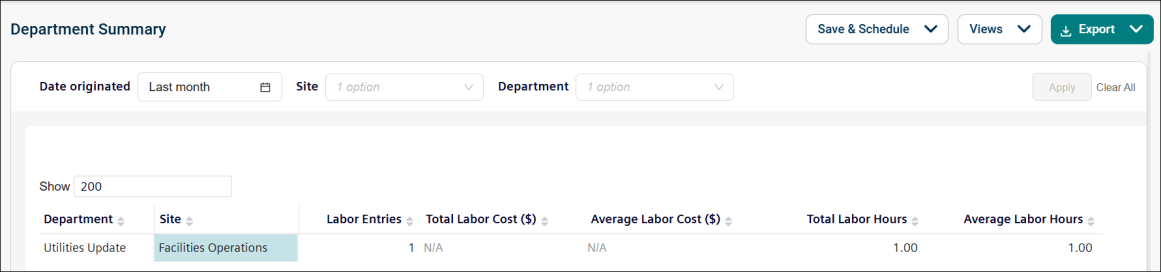
The Department Summary report offers a consolidated view of labor data, broken down by department. This helps you analyze labor entries and associated costs for each department.
Use this report to:
-
Review total labor entries for each department.
-
Analyze labor costs per department.
-
Gain insights into departmental resource allocation.
Getting Started
Filters
Filters are located above the main report area. Use them in any order.
|
Filter |
What It Does |
Default |
|
Date Originated |
Filters within a specific date range. NOTE Refer to Limitations article for date selection. |
Last month |
|
Department |
Filters the data by specific departments. |
All |
|
Site |
Filters the data by the associated site. |
All |
Report Structure
This report summarizes labor data per department, showing total labor entries and total labor costs.
Fields
|
Field |
Description |
|
Department |
Indicates the name of the department. |
|
Site |
Identifies the site associated with the department. |
|
Labor Entries |
Shows the number of labor entries recorded for the department. |
|
Total Labor Cost |
Displays the total labor cost for the department. |
|
Average Labor Cost |
Shows the average cost per labor entry for the department. |
|
Total Labor Hours |
Shows total labor hours charged to the site. |
|
Average Labor Hours |
Shows the average hours per labor entry for the department. |
Common Tasks
-
Compare labor costs across different departments, filter by "Department" and review "Total Labor Cost."
-
Review labor activity for a specific site, filter by "Site."
