Back to Asset Essentials Main Menu
Asset Cost Summary Report
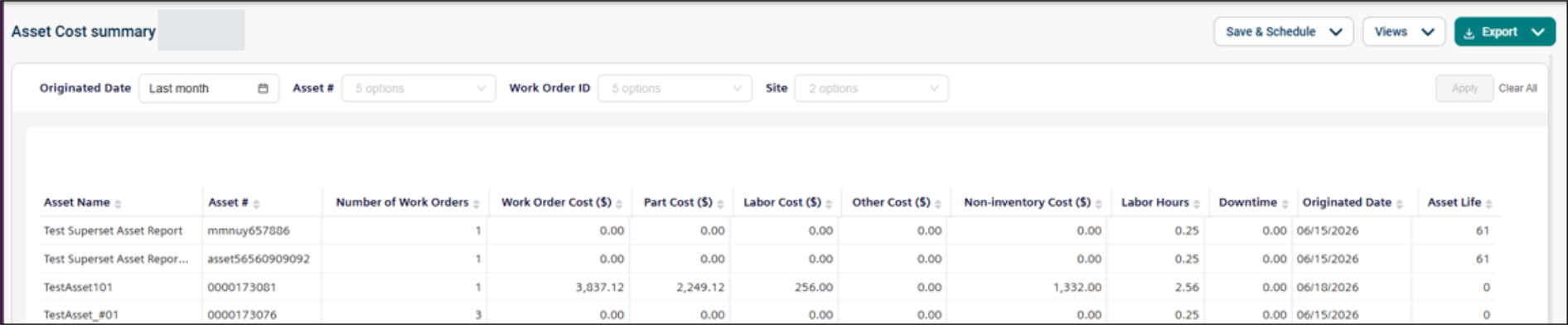
The Asset Cost Summary report provides insights into asset-related costs and performance based on work order activity. It helps you monitor maintenance expenses by combining labor, parts, non-inventory, and other costs, along with labor hours, downtime, and asset life.
Use this report to:
-
Analyze the individual work order costs.
-
Review cost breakdowns across labor, parts, non-inventory, and other categories.
-
Monitor labor hours and asset downtime.
-
Identify high-cost or high-maintenance assets.
-
Support budgeting and asset lifecycle planning.
Getting Started
Filters
Filters are located above the main report area. Apply the filters in any order to narrow the results.
|
Filter |
What It Does |
Default |
|
Originated Date |
Filters work orders originated date. NOTE Refer to Limitations article for date selection. |
Last month |
|
Asset # |
Filters by the unique identifier of the asset. |
All |
|
Work Order ID |
Filters results by a specific work order ID. |
All |
|
Site |
Filters the data by the associated site. |
All |
Report Structure
This report summarizes asset and work order data, including cost breakdowns, labor hours, downtime, and lifecycle details. Each row displays the count of work order all time (regardless of the report filters) and the costs per work order. Missing work order originated dates default to the created or last modified date.
Fields
|
Field |
Description |
|
Asset Name |
Displays the asset name as defined in the source system. This field is sorted alphabetically (A → Z) by default. |
|
Asset # |
Asset Number is a user-visible tracking number entered manually, generated automatically, or left blank. Use this field to search, filter, and identify the asset across the system. |
|
Number of Work Orders |
Displays the all-time work orders. This remains blank if no work order is linked. |
|
Work Order Cost |
Represents the total cost of the work order attributed to the asset. This includes labor, parts, non-inventory, and other costs. |
|
Part Cost |
Displays the total inventory (part) cost charged to the asset. Includes directly attributed costs and a proportional share of work order–level unattributed costs. |
|
Labor Cost |
Shows the total labor cost for the asset. Includes directly attributed labor costs and a proportional share of unattributed work order–level labor costs. |
|
Other Cost |
Represents additional work order–level costs (such as contractor charges). These costs are distributed equally across all assets linked to the work order. |
|
Non-Inventory Cost |
Displays the total cost of non-inventory (miscellaneous) items. Includes directly attributed costs and a proportional share of unattributed work order–level costs. |
|
Labor Hours |
Shows total labor hours charged to the asset. Includes directly attributed hours and a proportional share of unattributed work order–level hours. |
|
Downtime |
Displays the total downtime for the asset (in hours) associated with the work order. Defaults to '0' if not specified. |
|
Originated Date |
Indicates the work order’s originated date. If unavailable, the system uses the created date or last modified date as a fallback. |
|
Asset Life |
Shows the expected useful life of the asset in years. |
Common Tasks
-
Review maintenance costs for a specific asset, filter by Asset #.
-
Analyze a particular work order, filter by Work Order ID.
-
Compare asset costs across locations, filter by Site.
