Back to Asset Essentials Main Menu
Asset Age Report
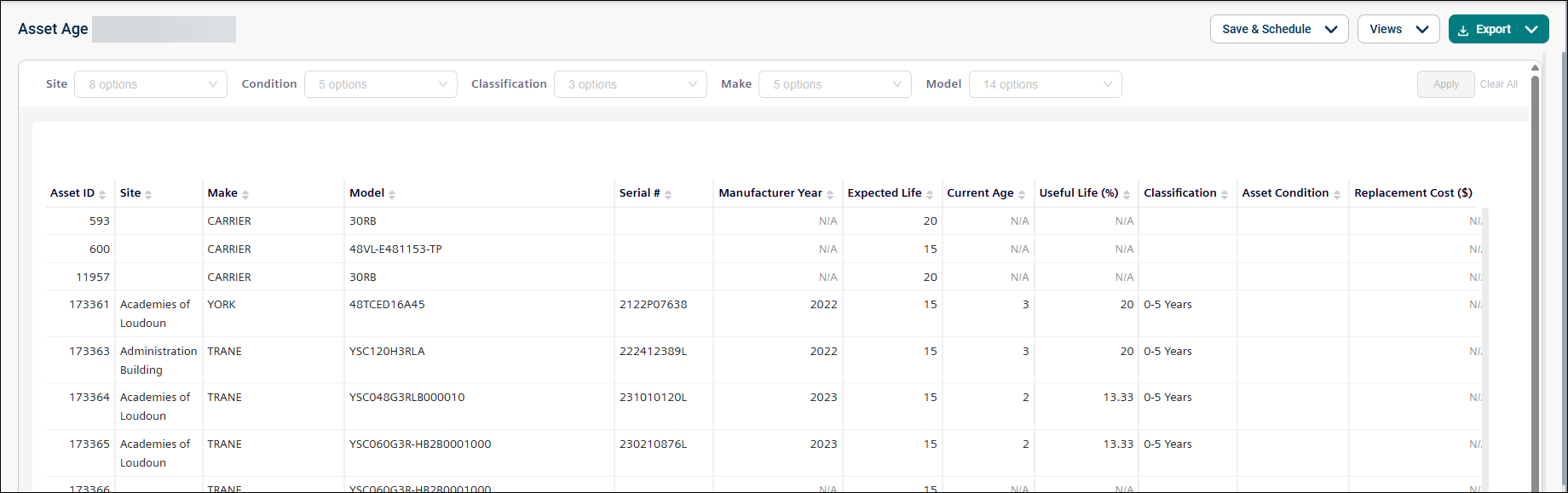
The Asset Age report provides insights into asset age, condition, and replacement costs. It helps you identify assets that may require replacement and supports capital budgeting and lifecycle planning. This report is driven partly by Dynamic Data and thus is only available to Dynamic Data customers.
NOTE Refer to Limitations article for date selection.
Use this report to:
-
Identify aging assets that may require replacement.
-
Forecast capital expenditures.
-
Prioritize replacements based on condition and remaining life.
-
Review asset lifecycle information across sites.
-
Estimate replacement costs for groups of assets.
Getting Started
Filters
Filters are located above the main report area. Use them in any order.
|
Filter |
What It Does |
Default |
|
Site |
Filters assets by site or facility. |
All |
|
Condition |
Filters assets by condition (Good, Fair, or Poor). |
All |
|
Classification |
Filters assets by remaining life category. |
All |
|
Make |
Filters assets by manufacturer. |
All |
|
Model |
Searches for a specific asset model. |
All |
Report Structure
This report displays asset lifecycle and replacement planning information, including asset age, condition, expected life, and replacement cost. Each row represents a single asset.
Fields
|
Field |
Description |
|
Asset ID |
Displays the asset identifier and asset name. |
|
Site |
Shows the location of the asset. |
|
Make |
Displays the asset manufacturer information. |
|
Model |
Displays the asset model information. |
|
Serial # |
Shows the serial number of the asset. |
|
Manufacturer Year |
Indicates the year the asset was manufactured. Blank if no Serial # provided. |
|
Expected Life |
Displays the expected lifespan of the asset in years. |
|
Current Age |
Shows the current age of the asset. Blank if no Serial # provided. |
|
Useful Life (%) |
Indicates the percentage of expected life consumed. Blank if no Serial # provided. |
|
Classification |
Displays the remaining life category. Blank if no serial # provided. |
|
Asset Condition |
Shows the condition of the asset. |
|
Replacement Cost ($) |
Displays the estimated replacement cost. |
Common Tasks
-
Review assets nearing end of life using the Classification filter.
-
Identify assets in poor condition using the Condition filter.
-
Estimate replacement budgets using Replacement Cost.
-
Compare assets by manufacturer using the Make filter.
-
Locate a specific asset using the Model filter.
