Work Order Transaction Detail
The Work Order Transaction Detail report provides a detailed view of maintenance-related financial transactions. It helps users trace labor, material, equipment, and service costs back to individual work orders.

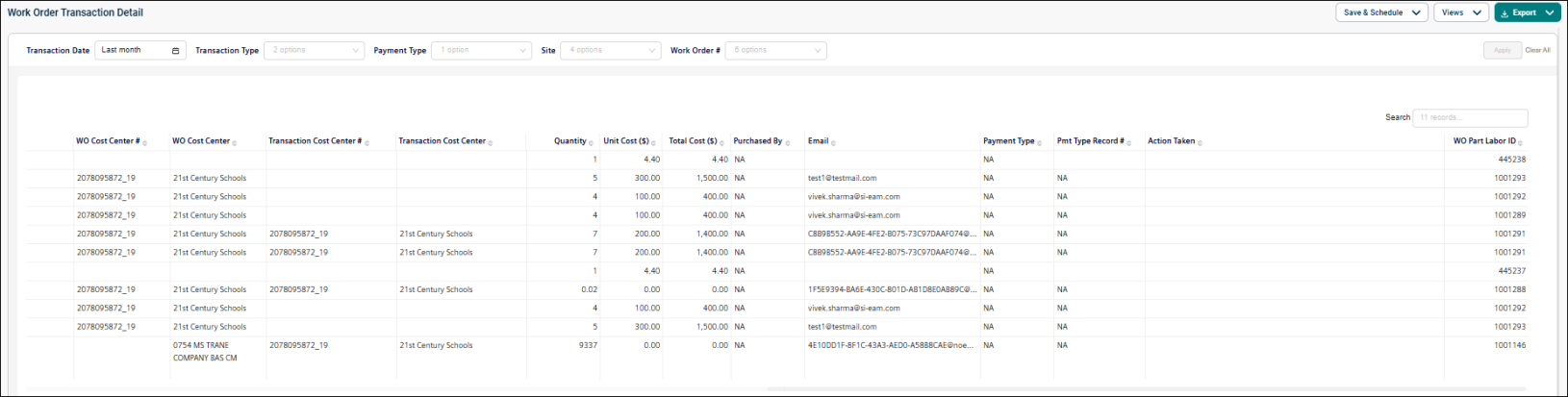
Use this report to:
-
Review maintenance transactions in detail.
-
Analyze costs by transaction type.
-
Audit work order spending.
-
Reconcile financial records.
-
Investigate labor, material, and service costs associated with work orders.
Getting Started
Filters
Filters are located above the main report area. Use them in any order.
|
Filter |
What It Does |
Default |
|
Transaction Date |
Filters transactions within a selected date range. NOTE Refer to Limitations article for date selection. |
Last month |
|
Transaction Type |
Filters transactions by transaction type. |
All |
|
Payment Type |
Filters transactions by payment method or payment type. |
All |
|
Site |
Filters transactions by site. |
All |
|
Work Order # |
Filters transactions by a specific work order number. |
All |
Report Structure
This dashboard-style report summarizes transaction-level details for maintenance activities using KPIs, graphs and tables.
Fields
|
Field |
Description |
|
Transaction Type |
Type of transaction occurred (such as Labor, Materials, Contract Services, Rental, Issue, WO Dispatch, and Equipment Usage). |
|
Site |
Site or location associated with the transaction, purchase, or work order. |
|
Parent Location |
Location where the transaction occurred. |
|
Building |
Building associated with the transaction or work order. |
|
Supplier/Employee |
Supplier or full name of the person who completed the transaction. |
|
Project |
Name of the project associated with the Work Order (WO). |
|
Work Order # |
Work Order number on which the transaction occurred. |
|
Transaction Date |
Date the transaction took place. This field should never be blank. When no transaction date is available, use the created date. This is the anchor column used to determine whether data is included or excluded from the report. |
|
Reg/OT |
For labor transactions, indicates whether the labor entry was Regular Time (Reg) or Overtime (OT). |
|
Work Requested |
Free-text field describing the work requested within the Work Order. |
|
Work Category |
Work Category associated with the Work Order. |
|
Description |
Free-text description explaining the transaction that occurred. |
|
Work Type |
Work Type associated with the Work Order. |
|
Originator |
Originator of the Work Order. |
|
WO Cost Center # |
Cost Center number associated with the Work Order. |
|
WO Cost Center |
Cost Center name associated with the Work Order. |
|
Transaction Cost Center # |
Cost Center number associated with the transaction itself. |
|
Transaction Cost Center |
Cost Center name associated with the transaction itself. |
|
Quantity |
Quantity of the transaction (e.g., labor hours, parts purchased, equipment usage, etc.). |
|
Unit Cost ($) |
Unit cost of the transaction (e.g., labor rate, part cost, rental rate, etc.). |
|
Total Cost ($) |
Total cost of the transaction, calculated as Quantity × Unit Cost. |
|
Purchased By |
Name of the user who made the purchase. |
|
|
Email address associated with the user. |
|
Payment Type |
Method of payment used for the transaction. |
|
Pmt Type Record # |
Unique record identifier associated with the selected payment type. |
|
Action Taken |
Action performed on the transaction or payment record. |
|
WO Part Labor ID |
Unique identifier for the related work order part/labor record. |
Common Tasks
-
Review detailed transactions for a work order.
-
Analyze costs by transaction type.
-
Audit maintenance spending.
-
Reconcile costs with financial systems.
