Labor Time vs. Cost Analysis Report
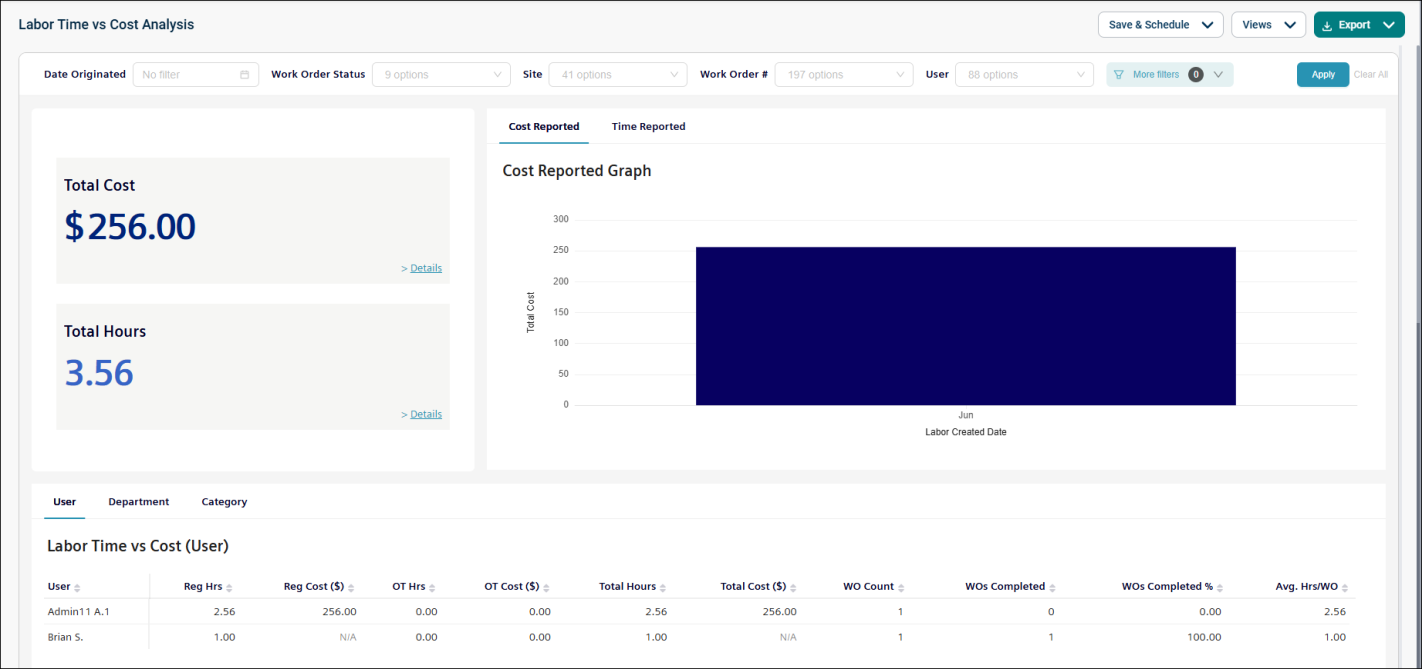
The Labor Time vs. Cost Analysis report provides insights into technician labor hours and associated costs. It helps you evaluate workforce efficiency and cost-effectiveness by comparing time logged against labor expenses across work orders. This report includes both tabular data and visual charts for analysis. This is a Dashboard report, meaning it contains multiple charts and visuals, potentially across different tabs.
Use this report to:
-
Analyze labor costs in relation to hours worked.
-
Identify users or departments with high labor utilization or cost.
-
Compare regular and overtime hours and costs.
-
Monitor work order completion rates and efficiency.
-
Evaluate average labor hours per work order.
Getting Started
Filters
Filters are located above the main report area. Use them in any order.
|
Filter |
What It Does |
Default |
|
Date Originated |
Filters within a specific date range. NOTE Refer to Limitations article for date selection. |
Last month |
|
Work Order Status |
Filters the work order by multiple or single status (e.g., New, On hold, etc.) |
All |
|
Site |
Filters the data by the associated site. |
All |
|
Work Order # |
Filters results by a specific work order number. |
All |
|
User |
Filters data based on the associated user. |
All |
|
Department |
Filters records by the associated department. |
All |
|
Category |
Filters data based on the selected category. |
All |
Report Structure
This dashboard-style report displays labor data across multiple visuals and tables. It includes user, department, and category details, along with regular and overtime hours, associated costs, and work order metrics. Data is summarized based on applied filters and “view by” selections, allowing for flexible analysis of labor performance and costs.
Fields



|
Field |
Description |
|
User |
User who logged the time/labor entry. |
|
Department |
Department associated with the user who has entered labor hours on a work order (not required). |
|
Category |
Indicates the classification of the work order. |
|
Reg Hrs |
Number of regular hours, either summarized on the main dashboard or shown individually for a single labor transaction. |
|
Reg Cost |
Cost associated with the regular hours. |
|
OT Hrs |
Number of overtime hours, either summarized on the main dashboard or shown individually for a single labor transaction. |
|
OT Cost |
Cost associated with the overtime hours. |
|
Total Hours |
Total number of hours (regular and overtime) logged by a user. |
|
Total Cost |
Total cost for all hours logged (regular and overtime). |
|
WO Count |
Summarized count of work orders based on the selected “view by” option after applying filters. |
|
WOs Completed |
Total number of work orders that have been completed. |
|
WO Completed % |
Percentage of work orders completed based on the selected “view by” option. |
|
Avg. Hrs/WO |
Average number of labor hours (regular and overtime) recorded per work order. |
Common Tasks
-
Analyze labor activity within a specific period, use the Date Originated filter.
-
Review performance of a specific user, filter by User.
-
Compare labor data across sites or departments, use the Site or Department filters.
-
Evaluate work order progress, filter by Work Order Status.
-
Track efficiency trends, review Total Hours, Total Cost, and Avg. Hrs/WO.
