Detailed Sub-Location Expenditure Report
The Detailed Sub-Location Expenditure report provides a detailed view of expenditures within specific rooms or areas. It helps users understand spending patterns and work order activity at a more granular level.
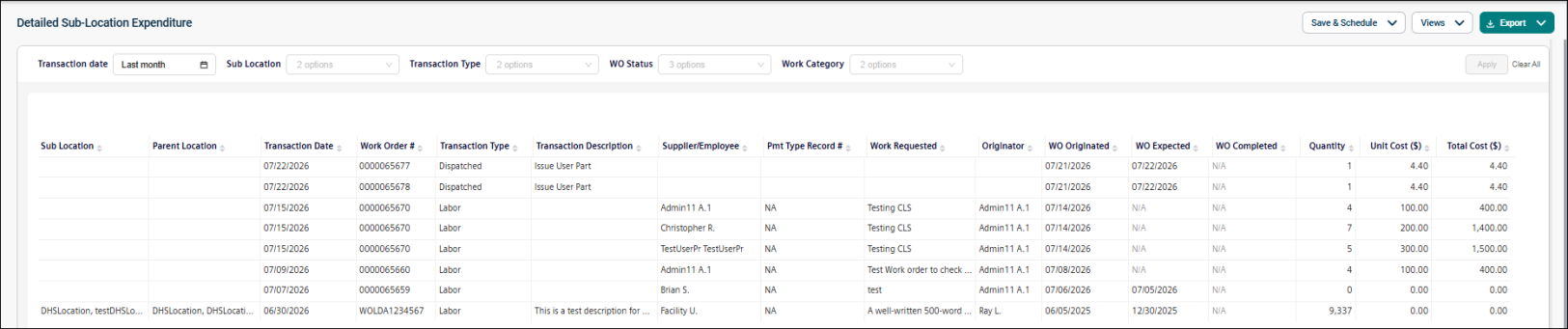
Use this report to:
-
Analyze spending within specific areas or rooms.
-
Identify detailed cost drivers.
-
Track work order activity by sub-location.
-
Monitor expenditures by work category.
Getting Started
Filters
|
Filter |
What It Does |
Default |
|
Transaction Date |
Filters transactions by date range. NOTE Refer to Limitations article for date selection. |
Last month |
|
Sub Location |
Filters transactions by sub-location. |
All |
|
Transaction Type |
Filters transactions by transaction type. |
All |
|
WO Status |
Filters by work order status. |
All |
|
Work Category |
Filters by work category. |
All |
Report Structure
This report displays expenditure details at the sub-location level. Each row represents a single financial transaction.
Fields
|
Field |
Description |
|
Sub-location |
Source location of the work order (WO). |
|
Parent Location |
Parent location associated with the sub-location. |
|
Transaction Date |
Date the transaction occurred. If the transaction date is unavailable, the record creation date is used. This field determines whether a record is included in the report based on the selected date range. |
|
Work Order # |
Work order number associated with the transaction or cost. |
|
Transaction Type |
Types of transaction recorded, such as Labor, Materials, Contract Services, Rental, Issue, WO Dispatch, Equipment Usage, or Other Cost. |
|
Transaction Description |
Description of the transaction. Depending on the transaction type, this may include an employee name, part name, item description, service description, rental description, equipment usage description, or purchase order note. |
|
Supplier/Employee |
Supplier associated with a non-inventory purchase transaction or purchase order. |
|
Pmt Type Record # |
Invoice, reference, or purchase order number associated with a purchase-type transaction. |
|
Work Requested |
Description of the work requested in the associated work order. |
|
Originator |
Name of the person who originated the work order. |
|
WO Originated |
Date the work order was created. |
|
WO Expected |
Expected completion date of the work order. |
|
WO Completed |
Actual completion date of the work order. |
|
Quantity |
Quantity associated with the transaction. Depending on the transaction type, this may represent labor hours, inventory quantity used, purchased quantity, rental quantity, or equipment usage hours. |
|
Unit Cost ($) |
Cost per unit associated with the transaction. |
|
Total Cost ($) |
Total cost of the transaction. |
Common Tasks
-
Analyze spending in a specific room or area.
-
Review costs by work category.
-
Track open or completed work orders.
-
Identify expenditure trends.
